


Furrion Vision S Left and Right Cameras Are Backwards
Updated 02/26/2021 | Published 02/21/2021
Question:
Fiannly got a chance to install my Furrion Vision S camera system. All works, just left and right cameras are backward. What’s the best approach to repairing them? Which button on the bottom of the camera to release pairing? Rubber or recessed? Neither have worked so far. Should the blue led go out? Constantly on. Can I reset the monitor/wipe all pairs? Thanks in advance for the help.
asked by: Bob B
Expert Reply:
Thanks for the purchase of the Furrion Vision S Wireless RV Observation Camera System with Side Marker Light Cameras - 5" Screen # FCE48TASL-05 and we can help you out with the backwards cameras.
What you'll do is go to Setup on the menu, press the Mirror option, select the camera you want to change, and you will have the option of selecting Rotate, Flip, or Flip and Rotate; if you want to check it out yourself you can find this on page 21 of the instructions.
The monitor paring button is the large circular button on the bottom of the camera, as seen on page 8. The blue LED will stay on as it is the notification that the monitor has power, and the system can't be wiped, but you can unpair and try again by holding the pairing button for 15 seconds.


Product Page this Question was Asked From
Furrion Vision S Wireless RV Backup Camera System w/ 3 Cameras - 5" Screen
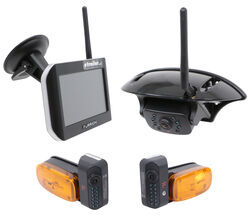

- RV Camera System
- Backup Camera
- Observation Camera
- Anti-Glare
- Mirrored Image
- Motion Detecting
- Night Vision
- Touch Screen
- Waterproof
- Wireless
- Wide View
- Dashboard Mounting Bracket
- Suction Cup Mount
- Side Marker
- 5 Inch Display
- 3 Cameras
- Furrion
more information >
Featured Help Information
Instructions
Miscellaneous Media

Continue Researching
- Q&A: RV AC With Cooling and Heat for a Goosneck Trailer That Does Not Have An AC
- Q&A: Will B&W Continuum Work With 2024 Ford F-250 Towing 2021 Keystone Hideout 28RKSWE
- Q&A: Best Replacement For Iota ILC-3045 Load Center
- Q&A: Back Up Camera For an In Bed Camper
- Q&A: Will Goodyear Endurance ST225/75R15 Fit 2024 Winnebago Access 26RL
- Q&A: Replacement Side Cameras for a 2014 Newmar Canyon Star 3953
- Q&A: Recommended Lock for MORryde GooseTech 5th Wheel to Gooseneck Pin Box
- Article: 4 Steps to Choosing Your 5th Wheel Pin Box
- Article: Trailer Wiring Diagrams
- Article: How to Measure for Travel Trailer and Fifth Wheel Steps
- Article: How to Choose the Right Trailer Hitch Class
- Article: How Your RV Water System Works: A Complete Newbie's Guide
- Article: Ball Mount Basics: Weight Capacity, Class, and Size
- Article: How to Winterize & De-Winterize Your RV (Simple Guide)