


How to Pair Camera and Monitor of Furrion Vision S Observation Camera FOS43TASF
Updated 05/21/2019 | Published 05/19/2019
Question:
Fusion vision s5. My camera won’t connect. Has power to both
asked by: Tom
Expert Reply:
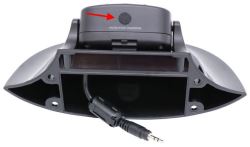
To pair the camera and monitor parts of your Furrion Vision S observation camera system # FOS43TASF you can try pressing the button on the bottom of the camera. Please refer to the linked photo.
First disconnect power to both camera and monitor components for a few minutes so they fully power down. Then reconnect power to both and press the button on the bottom of the camera. Press and hold the button for 2 or 3 seconds. The camera should then pair to the monitor as long as everything has power.
In a separate link I also sent along the instruction manual for this system. Page 8 covers the pairing process.

Product Page this Question was Asked From
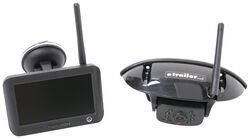
Furrion Vision S Wireless RV Backup Camera System w/ Night Vision - Rear Mount - 4.3" Screen

- RV Camera System
- Backup Camera
- Observation Camera
- Built-In Microphone
- Touch Screen
- Anti-Glare
- Mirrored Image
- Night Vision
- Motion Detecting
- Waterproof
- Pre-Wired RVs
- Wireless
- Standard View
- Dashboard Mounting Bracket
- Suction Cup Mount
- Rear
- 4.3 Inch Display
- 1 Camera
- Furrion
more information >
Featured Help Information
Instructions

Continue Researching
- Search Results: gooseneck trailer locks
- Shop: Gooseneck Hitch
- Shop: Fifth Wheel Hitch
- Shop: Trunk Bike Rack
- Shop: Replacement 5" Monitor for Furrion Vision S Wireless RV Camera System
- Shop: InfiniteRule SnapLatch Coupler Lock with Guard Ball
- Shop: Furrion Vision S Wireless RV Backup Camera System w/ Night Vision - Rear Mount - 4.3" Screen
- Shop: Furrion Vision S Wireless RV Backup Camera System w/ 3 Cameras - 5" Screen
- Shop: Andersen Weight Distribution Hitch w Sway Control - 6" Drop/Rise - 14K GTW, 1.4K TW
- Shop: Replacement Color Touchscreen Display for TST TPMS Systems - 770 Series, 5" Screen
- Shop: PullRite OEX SuperLite 5th-Wheel Hitch for Ford Super Duty Prep Package - 25,000 lbs
- Shop: Brake Controller
- Search Results: ebike carrier
- Shop: Camper Tie-Downs
- Search Results: furrion rear camera
- Q&A: How To Pair Bluetooth Devices To The Furrion DV3300SBL RV Stereo System
- Q&A: Height Settings For The PullRite OEX SuperLite 5th Wheel Hitch
- Q&A: 2025 Ford F-250 Super Duty 5th Wheel Hitch Recommendation
- Q&A: Is There a Ram Mount for the Replacement 7" Monitor for Furrion Vision S Wireless RV Camera System
- Q&A: Can etrailer Scissor Jack be Used as a Replacement for a Jayco Camper?
- Q&A: Recommended Replacement Camera Monitor For A Furrion Vision S Camera System
- Q&A: Does Pullrite OEX SuperLite work with Rotaflex Cushioned Pin Boxes
- Shop: Floor Mats
- Search Results: pin box
- Search Results: pullrite 5th wheel hitch
- Search Results: pullrite 5th wheel gooseneck adapter
- Video: Checking Out the PullRite OEX SuperLite 5th-Wheel Hitch for Ford Super Duty Prep Package
- Video: PullRite OEX SuperLite 5th-Wheel Hitch for Ford Super Duty Prep Package Review
- Article: 4 Steps to Choosing Your 5th Wheel Pin Box
- Search Results: pullrite superlite