


How to Change to Between Units of Performance Tool Digital Torque Adapter
Updated 09/24/2018 | Published 09/21/2018
Question:
How do you change setting to lbs.
asked by: Tonya L
0
Expert Reply:
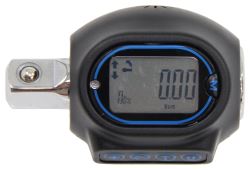
Use the "U" botton the torque adapter, part # PTM206, to change between units. It's able to measure in kg-cm, kg-m, N-m or like you need ft-lb.
I've linked the demo video. In the video just after the 2:05 mark you can see the speaker cycle through the different units.
expert reply by:
Charles S

0

click to enlarge

Product Page this Question was Asked From

Featured Help Information
Instructions
Miscellaneous Media

Continue Researching
- Q&A: Spare Carrier Recommendation for 22.5 inch Class A Motorhome Wheel
- Q&A: B and W Tongue Weight Scale Recommendation for 2024 Airstream GT
- Q&A: How to Use B&W Digital Tongue Weight Scale
- Article: Anti-Rattle Devices
- Q&A: Comparing Curt and Draw-Tite Trailer Hitches for a 2015 Honda Odyssey
- Q&A: Repair Kit For a Roadmaster Falcon All Terrain Tow Bar
- Q&A: Recommended Weight Distribution System and Extended Shank for a 2019 Rockwood Geo Pro G16TH
- Q&A: Recommended Drop Shank for Equal-i-zer Weight Distribution System
- Article: How to Measure for Trailer Hitch Drop
- Article: How to Choose the Right Trailer Hitch Class
- Article: 2024 Top Gifts for Auto Enthusiasts & Road Trippers
- Article: 2024 Top Gifts For Outdoor Enthusiasts
- Article: Trailer Hitch Installation Tips
- Article: Rooftop Cargo Carriers