


Resetting the Pin on the LCI Leveling System Remote Control
Updated 05/30/2025 | Published 09/02/2017
Question:
How do you reset the pin on the lci remote
asked by: Mike
Expert Reply:
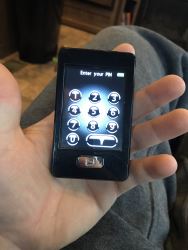
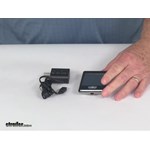
The pin on your LCI remote # LC358601 can be reset by following these simple steps. Press "home" button to turn on transmitter. Then press and release "home" button 5 times. Then press "config". The screen will ask you if you want to reset the screen lock PIN code. The screen will also confirm when the PIN has been reset. I've attached a photo to assist.


Miki J.
3/24/2020
Im in the same boat I need only the charger too where can I get one ?


Sherry
7/25/2020
THANK YOU! We could not get our awning lights off. What a mystery! Finding the remote and resetting the password solved it all.

Fred
5/30/2025
Followed the instructions but after i press the configure button nothing changes. The configure button does not say configure it is just a symbol that looks like a light bulb. Any suggestions? Thanks

Product Page this Question was Asked From
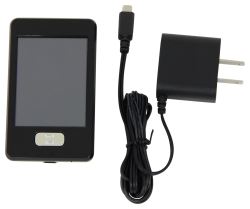
Replacement Touchscreen Remote w/ Charger for Lippert Ground Control 3.0 Electric Leveling System

- Accessories and Parts
- Camper Jacks
- Trailer Jack
- Controllers
- Remote Control
- Lippert
more information >
Featured Help Information
Instructions
Miscellaneous Media

Continue Researching
- Search Results: anderson hitch
- Search Results: weight distribution hitch
- Search Results: furrion rv air conditioners
- Shop: Replacement Touchscreen Remote w/ Charger for Lippert Ground Control 3.0 Electric Leveling System
- Search Results: shackle straps
- Video: Lippert Components Trailer Jack LC358601 Review
- Shop: Replacement New-Style Linc Analog Remote - 5 Function
- Q&A: Replacing the Lippert Touchscreen Remote 358601 or the Analog Remote 292614
- Q&A: Drain Hole Locations On A Furrion Roof Top AC Unit
- Shop: MORryde Suspension Upgrade Kit for Tandem Axle Trailers - 3-1/8" Long Shackle Straps
- Q&A: Wiring Diagram for Advent Air Conditioner ACM135
- Q&A: Recommended Replacement for the Parallax 7455T
- Shop: RV Designer Ball Bearing Slide Set - 14" Long
- Search Results: trailer suspension parts
- Search Results: maxxair vent cover
- Q&A: Replacement Propane Gas Detector for an Atwood 31013 Propane Detector
- Shop: Andersen Weight Distribution Hitch w Sway Control - 4" Drop/Rise - 16K GTW, 1.6K TW
- Shop: Replacement Stainless Steel Trim Kit for Greystone Built-in Microwave
- Shop: Andersen Weight Distribution Hitch w Sway Control - 4" Drop/Rise - 10K GTW, 1.4K TW
- Q&A: Comparing MORryde AllTrek and SRE4000 Premium Rubber Suspension Equalizers
- Shop: Suspension Enhancement
- Shop: Brake Controller
- Q&A: Can the Touchscreen Remote LC358601 Be Used to Replace a Lippert Components IDS Transmitter 329164
- Search Results: ladder
- Video: Detailed Breakdown of the Roof Vent Installation Kit
- Shop: Tonneau Cover
- Video: What to Know About the Taylor Made Removable Dock Post Bumper
- Video: Comprehensive Review: Mushroom Vent
- Video: Checking Out the Mushroom Vent
- Video: Review of Revive RV Wallpaper - Peel-and-Stick RV Wallpaper Kit - GR78FR
James A.
3/7/2020
I have the remote. Thanks -this helped me change the password....but I need a charger...??