


How Do I Install The Lippert Screen Defender Screen Protector?
Updated 11/10/2026 | Published 11/09/2026
Question:
I ordered a lippert pet screen protector for my screen door on our new 2026 Riverstone Legecy and I cannot figure out how to install it.
asked by: Michael H
Expert Reply:
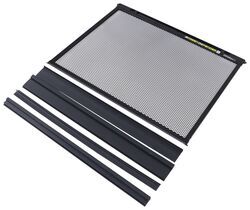
Hey Michael, thanks for reaching out. I can help with this. I'll go ahead and provide you with some general instructions, as well as a link to Lippert's screen defender installation manual. The Lippert Screen Defender # LC92FR is a pretty straightforward installation. It's designed to snap into the existing channels of a 30" Lippert RV screen door, so there's no drilling or additional mounting hardware required.
Start by opening your RV's entry door and screen door, then hold the Screen Defender in place to check the fit. If there's a gap at the bottom, use the included extension pieces to fill that space.
Next, position the bottom of the Screen Defender into the screen door's existing channels, then squeeze the spring-loaded latches at the top to slide it into place. Release the latches once everything is lined up and make sure the panel is securely seated. Finally, open and close your screen door a few times to make sure everything operates smoothly.
Also, here is a link to the Lippert manual:
https://lci-support-doc.s3.amazonaws.com/manuals/doors/entry-doors/ccd-0003487.pdf
What pets are you protecting? Do they paw the door a lot?


(click to enlarge)

Product Page this Question was Asked From
Screen Defender Screen Protector for Lippert RV Entry Doors - Fits Doors 30" Wide

- RV Door Parts
- Entry Door
- Screen Protectors
- Black
- Lippert
more information >

Continue Researching
- Q&A: Recommended SnapPad Jack Pads for a HWH Leveling System on a Motorhome
- Q&A: Compatibility of Lippert Screen Defender on Dexter Screen Door
- Q&A: Recommended Class IV Hitch for a 2012 Chevrolet Silverado 1500
- Q&A: Weigh Safe True Tow Weight Distribution System For 7,600 Pound Trailer
- Q&A: How To Choose Correct Size Lippert Screen Defender for Hearthand North Trail
- Q&A: Replacement Bulb for a Hengs Range Hood Model RO624500C
- Q&A: Lippert Screen Defender Screen Protector Compatibility On A Dexter Screen Door
- Article: How to Troubleshoot Your RV Air Conditioner
- Article: Adding Electric Over Hydraulic Disc Brakes
- Article: RV Propane Troubleshooting | Common Propane Issues and How to Solve Them
- Article: Our Team Picked The Best Camping Gear of the Year - Here Are Their Top Choices
- Article: How to Measure for Trailer Hitch Drop
- Article: What Do I Need To Tow A Trailer?
- Article: 30-Amp and 50-Amp RV Service: What's the Difference?