


How To Pair A Voyager WiSight Wireless RV Camera To The Monitor
Updated 06/09/2023 | Published 06/07/2023
Question:
Is the paring the same on the wvos541 can’t seem to get it to pair thanks
asked by: Jeff Y
Expert Reply:
The pairing process for the Voyager WiSight 2.0 Wireless RV Backup Camera System w/ Night Vision # ASA84YR and for the older WVOS541 model are as follows:
1. Make sure the monitor is connected to 12 Volt DC power supply, but 12 Volt DC power is removed from the camera (clearance lights turned off).
2. Press the SEL/PAIR button on the front of the monitor expected mode & select the appropriate AV source.
3. Press and hold the "SEL/PAIR" button on the front of the monitor for 5 seconds and release. (Monitor will display "PAIRING")
4. Apply 12 Volt DC power to the camera (turn on the clearance lights). If pairing multiple cameras to the system, make sure that only the only the corresponding camera (Camera 1 –Camera 4 corresponding to Monitor's CH1- CH4) has power when pairing.
If done correctly, the monitor will display "PAIRING SUCCESSFUL". If pairing is not successful, the monitor will display "PAIRING FAIL". If you receive this message you'll need to repeat the steps. It's important that you don't put power to the camera until the monitor is ready to pair. You also can't mix and match cameras or monitors between the two versions, so if you have an older model monitor or camera and you're trying to pair it with a newer model monitor or camera then it will keep failing to pair.

Product Page this Question was Asked From
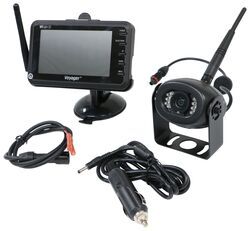
Voyager WiSight 2.0 Wireless RV Backup Camera System w/ Night Vision - Rear Mount - 4.3" Screen

- RV Camera System
- Backup Camera
- Built-In Microphone
- Mirrored Image
- Night Vision
- Waterproof
- Wireless
- Wide View
- Suction Cup Mount
- Rear
- 4.3 Inch Display
- 1 Camera
- Voyager
more information >

Continue Researching
- Q&A: Recommended Sway Bars and SumoSprings for a 2026 Ford E-450 Chassis
- Q&A: Recommended Voyager WiSight 2.0 Wireless RV Backup Camera System to Replace a Magnadyne Camera
- Q&A: Trouble Pairing Camera and Monitor on Voyager WiSight Wireless RV Backup Camera System
- Q&A: Direct Replacement for Voyager WVOS43 Camera System
- Q&A: Solution for Replacement Camera for Voyager WVOM43 Monitor
- Q&A: Back Up Camera For an In Bed Camper
- Q&A: Best Option to Upgrade Old Voyager Camera System With 4.3" Monitor
- Article: Is It Illegal to Leave My Hitch on My Truck?
- Article: Redarc Tow-Pro Elite Full Review
- Article: 30-Amp and 50-Amp RV Service: What's the Difference?
- Article: Trailer Lighting Requirements
- Article: Our Team Picked The Best Camping Gear of the Year - Here Are Their Top Choices
- Article: Installing an Electric Brake Controller on 2007-2013 GM Full-Size Truck or 2007-Present GM SUV
- Article: Wiring Trailer Lights with a 7-Way Plug (It's Easier Than You Think)