


How to Connect to VueSMART RV and Trailer Backup Camera WiFi Signal
Updated 05/04/2026 | Published 04/17/2022
Question:
Hello I just bought a Hopkins back up camera. It only shows up on wifi. When I turn off my data I can’t connect
asked by: Faisel
Expert Reply:
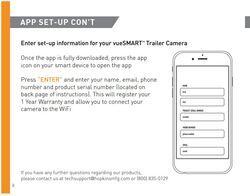
To connect to the WiFi on the VueSMART RV and Trailer Backup Camera # HM34FR you will need to register the product through the Hopkins Towing Solution App and then you'll be able to connect to the VueSMART by using the password "HOPKINSMFG". If you haven't registered the camera yet through the App then that's why you're having issues. You will also use the App to view the camera.
If you have followed all of these steps please let me know and I can help you troubleshoot further. Attached is a review video for you to check out.

(click to enlarge)

(click to enlarge)
Scott
4/3/2025
I've installed the app and registered. A still image showed up initially. After restarting the app, only a black screen is shown and the menu doesn't work.

Kim W.
5/3/2026
I purchased a used RV with the Hopkins camera. I don’t have the paperwork for camera so no product number. Can I still get it activated to use?



Featured Help Information
Miscellaneous Media

Continue Researching
- Search Results: 5th wheel installation kit
- Q&A: Replacement AC for Dometic Duo-Therm 3107541.009
- Search Results: 26003
- Search Results: 5th wheel hitch
- Search Results: 233665
- Search Results: 3000 watts rv power inverter
- Q&A: Difference Between Bargman 30-92-003 and Bargman 34-92-003 Tail Light Assemblies
- Search Results: trailer hitch
- Search Results: installation kit
- Shop: K-Source Snap & Zap Custom Towing Mirrors - Snap On - Driver and Passenger Side
- Shop: BAK Revolver X4s Hard Tonneau Cover - Roll Up - Aluminum and Vinyl - Matte Black
- Shop: Rich Solar Alpha 1 Pro Lithium Battery - Bluetooth - 100 Amp Hour
- Shop: Towing Mirrors
- Video: All You Need to Know About the Camco Vented RV Bumper Cap w/ Tether
- Video: All You Need to Know About the Refrigerator Vent Latches
- Video: Camco Vented RV Bumper Caps: The Breakdown
- Shop: RV Designer Rectangular Incandescent Tail Light w/ Back-Up, Reflex
- Shop: RV Designer Rectangular Incandescent License Light w/ Bracket - Back-Up with Reflex
- Shop: Replacement Hall Effect Motor for Lippert Components Ground Control 3.0 Leveling System
- Shop: RV City Water Inlet with Brass Check Valve - 1/2" MPT - Plastic Flange - Surface Mount - White
- Q&A: Looking For Replacement Door For Exterior Kitchen Pullout On 2018 Keystone Cougar
- Q&A: Blue Ox SwayPro VS TrackPro Weight Distribution System
- Shop: Trailer Hitch
- Q&A: Troubleshooting A Noisey Coleman-Mach RV Air Conditioner
- Q&A: Fit Of An Antenna Extender For The VueSMART RV Backup Camera
- Shop: Trailer Wiring
- Article: How to Wire an Electric Winch
- Article: Trailer Lighting Requirements
- Q&A: Is There a Video of the EcoHitch Hidden Front Hitch item # EH25HR Being Installed?
- Video: Transfer Switch w/ Quick Flip Connectors Feature Review
Stewie S.
12/27/2024
Trying to activate my camera has a password on WiFi setup up need password or how to reset it