


Furrion Vision S Wireless RV Backup Camera Will Not Turn Off
Updated 05/02/2025 | Published 11/19/2020
Question:
I just purchased a 2021 travel trailer, your backup camera from RV dealership and They installed the wireless backup camera. Once home in another state noticed after I unhitched and disconnected from battery the camera blue light was still on - have no idea how to turn it off as it has to be draining RV battery. While driving the camera worked great.
asked by: Robin
Helpful Expert Reply:

I'm sorry to hear about the Furrion Vision S draining your RV's battery!
The Furrion Vision S should be installed into the running light circuit of your travel trailer which will keep the Furrion Vision S from having power unless the vehicle is connected and the running lights are turned on.
Since you have power to the Furrion Vision S that means it is wired to a constant power supply. The only option to disconnect it is to unhook your RV's battery terminals when you are not towing it until you can have the dealership that did the install wire the camera to the running light circuit instead.


Product Page this Question was Asked From
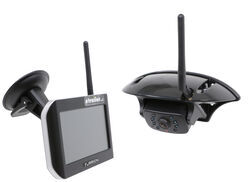
Furrion Vision S Wireless RV Backup Camera System w/ Night Vision - Rear Mount - 5" Screen

- RV Camera System
- Backup Camera
- Observation Camera
- Anti-Glare
- Mirrored Image
- Motion Detecting
- Night Vision
- Touch Screen
- Waterproof
- Pre-Wired RVs
- Wireless
- Wide View
- Dashboard Mounting Bracket
- Suction Cup Mount
- Side Marker
- 5 Inch Display
- 3 Cameras
- Furrion
more information >
Featured Help Information
Instructions
Miscellaneous Media


Continue Researching
- Q&A: Backup Camera for 2025 Forest River Rockwood Mini Lite 2205S
- Q&A: Can I Use The B&W Tow & Stow 2-Ball Mount BWTS20037B If My Camper's Dry Weight is 7600lbs
- Q&A: How to Power the Furrion Vision S+ Cameras to Work in Security Mode
- Q&A: Is There Furrion Vision S+ Observation System that Doesn't Have Side Cameras
- Q&A: What is Best RV Backup Camera System
- Q&A: Availability Of Replacement Camera For Furrion Vision S Camera System
- Q&A: How Do I Mount the Back Up Camera for the Furrion Vision S+?
- Article: Trailer Wiring Diagrams
- Article: Holiday 2025 | RVers’ Favorite Gear & Road Picks
- Article: 30-Amp and 50-Amp RV Service: What's the Difference?
- Article: How to Measure for Travel Trailer and Fifth Wheel Steps
- Article: Brake Controller 7- and 4-Way Installation Kit (ETBC7)
- Article: How to Install a Brake Controller on Chevrolet / GMC 1999-2006 Pickups
- Article: Wiring Trailer Lights with a 4-Way Plug (It's Easier Than You Think)
Jeff L.
5/2/2025
I have my Perrion S monitor plugged into a cigarette light adapter going into a USB of my dash. I cannot find a power switch for the monitor. If I unplugged from the cigarette lighter attachment will I lose connectivity the next time I try to use the back up camera? The monitor has been on in my truck for the last six weeks even though we’ve only gone out before weekend in the camper. Thank you. Jeff.