


Disabling the OEM Memory Setting on a 2003 Chevy Silverado to Install K-Source Towing Mirrors
Updated 07/27/2012 | Published 07/26/2012
Question:
I am puting the mirrors on a 2003 silverado with memory setting. Their was not instructions for disabeling the memory setting. How do I disable the memory?
asked by: Mark
0
Expert Reply:
I spoke with my contact at K-Source and he said that with the OEM memory feature on your 2003 Chevy Silverado to disengage it you will need to turn off the Curb Assist feature. If you do not turn off the Curb Assist feature the mirror will not function correctly. There should be information in the vehicle owners manual about the Curb Assist feature.
expert reply by:
Michael H

0

Product Page this Question was Asked From
K-Source Custom Extendable Towing Mirrors - Electric/Heat w LED Signal - Textured Black - Pair
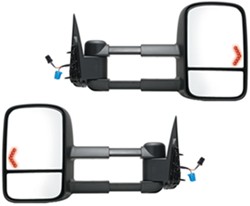

- Towing Mirrors
- Full Replacement Mirror
- Electric
- Pair of Mirrors
- Custom Fit
- Fits Driver and Passenger Side
- Blind Spot Mirror
- Extendable
- Folding
- Heated
- Turn Signal
- K Source
more information >

Continue Researching
- Q&A: Will K-Source Extendable Towing Mirrors Extend Further Than Factory Accordion Mirrors
- Article: How to Winterize & De-Winterize Your RV (Simple Guide)
- Q&A: Best Towing Mirrors for 2004 Chevy Silverado 2500HD
- Article: The Best Towing Mirrors
- Q&A: Availability of Load Range D Kenda Karrier KR53 ST205/75R15 With Black Aluminum Wheel
- Q&A: How to Tell Difference Between Old and New Body Style of 2007 Chevy Silverado
- Article: Brake Controller Installation on a Ford Full-Size Van
- Q&A: Replacement Seal Recommendation for Dexter 010-004-00
- Q&A: Towing Mirrors for 2004 Chevy Silverado
- Q&A: Tow Mirror Solution for 2005 Chevy Silverado 3500 with Telescoping Mirrors
- Article: How to Install a Weight Distribution Hitch (With Pictures & Video)
- Article: Choosing the Right Suspension Kit for Your Truck and Trailer
- Article: Rooftop Cargo Carriers
- Article: How to Measure for Trailer Hitch Drop