


How to Un-Pair Camera for Furrion RV Observation System # FOS05TASF
Updated 10/12/2024 | Published 06/01/2019
Question:
How do I unpair the Furrion FOS05TASF camera? I have it paired to the door camera by accident or default when all i have is a rear camera.
asked by: Eric Y
Expert Reply:
In order to un-pair the camera on your Furrion RV Observation System # FOS05TASF and assign it to the correct designation you will first just need to press the button at the bottom of the camera itself and hold it down for 15 seconds. This will un-pair the unit.
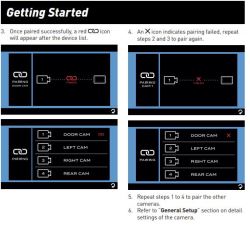
Once this is done you will just follow the original pairing steps again as outlined in the instructions manual (and also attached below) to set it as the rear camera.


Russ
8/20/2024
Thank you Chris for a complete solution. It took a few times on the left side camera but, got it. Mine is a 2021 Jayco and I wish the cameras and monitor had better resolution. I replaced the 5" with the 7" hoping for a better experience It is what it is for now. Any suggestions for upgrades? Thanks again, Russ

Eric
10/12/2024
This system has been working fine for me for several months. Then all of a sudden it stopped working and said no signal. Lights on, everything plugged in and normal. I tried to pair it and it was failing. So I took it off the mount and brought it in the truck and plugged it in with the monitor, everything lights up normally, but every time I try to pair it, it fails. I tried to unplug everything over night and try again in the morning, everything fails. I've tried to pair it to door, rear, etc and none work. Any ideas on how to get it to pair?

Product Page this Question was Asked From
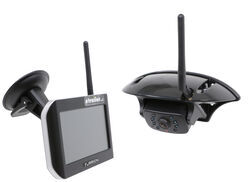
Furrion Vision S Wireless RV Backup Camera System w/ Night Vision - Rear Mount - 5" Screen

- RV Camera System
- Backup Camera
- Observation Camera
- Anti-Glare
- Mirrored Image
- Motion Detecting
- Night Vision
- Touch Screen
- Waterproof
- Pre-Wired RVs
- Wireless
- Wide View
- Dashboard Mounting Bracket
- Suction Cup Mount
- Side Marker
- 5 Inch Display
- 3 Cameras
- Furrion
more information >
Featured Help Information
Instructions
Miscellaneous Media


Continue Researching
- Search Results: bunk ladders rv ladders
- Search Results: pullrite capture plate
- Shop: 7-Way Vehicle Power Adapter for Furrion RV Observation Camera
- Shop: PullRite SuperGlide Quick Connect Capture Plate for Lippert Helux Pin Boxes
- Shop: 12V PWM Filter for RV Backup Camera Systems - Hardwire
- Shop: Lippert Telescopic RV Bunk Bed Ladder - Aluminum - 83-3/4" Extended Height - 250 lbs
- Shop: Stromberg Carlson RV Ladder Extension - Aluminum - 48" Tall - 250 lbs
- Shop: Furrion Vision S+ Wireless RV Backup System w/ 1 Camera - 7" Screen
- Q&A: Pairing A Side Marker Camera On The Furrion Vision S Wireless RV Back Up Camera
- Search Results: furrion 7 way adapter
- Search Results: furrion s monitor
- Q&A: How to Determine the Pin Weight of a 5th Wheel Trailer
- Q&A: Troubleshooting Signal Issues With A Furrion Vision S RV Camera System
- Q&A: Troubleshooting Intermittent Signal Loss With A Furrion Vision S RV Camera System
- Q&A: No Signal on Furrion Vision S Wireless RV Backup Camera System
- Video: Setting up the 12V PWM Filter for RV Backup Camera Systems on a 2021 Thor Coleman Motorhome
- Search Results: add coupon code
- Shop: Replacement 12V Cord for Thomas Payne Momentum Recliners and Sofas - Qty 1
- Video: Hands-On with the Replacement 12V Cord for Thomas Payne Momentum Recliners and Sofas
- Search Results: dual wheel fenders
- Search Results: vision s
- Shop: Nerf Bars - Running Boards
- Shop: Tonneau Cover
- Q&A: Issues With Furrion Vision S Monitor and Camera Not Pairing
- Q&A: No Signal And PWM Fix For Furrion Vision S Camera System Connected To 2022 GMC
- Shop: Gooseneck Hitch
- Video: How to Set Up Your Timbren Suspension Enhancement System on a 2022 Ford F-450 Super Duty
- Video: An In-Depth Look at the MORryde RV Door Latch Extender
- Shop: Towing Mirrors
- Video: In-Depth Review of the 7-Way Vehicle Power Adapter for Furrion RV Observation Camera
Can’t I.
1/17/2020
I tried resetting camera with button and did not work. With power off or on.