


Setting Tekonsha Primus Brake Controller Power/Gain for Proper Braking Strength
Updated 05/02/2019 | Published 05/01/2019
Question:
Brakes grab when applied How do you adjust for brakes that grab when brakes are applied?
asked by: Alan S
0
Expert Reply:
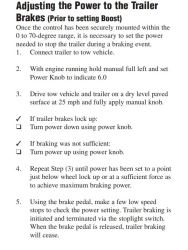
If your brakes are locking up when you are using the Tekonsha Primus IQ Trailer Brake Controller # TK90160, then you need to decrease the gain on your controller using the blue dial on the left side. The proper adjustment should not lock your brakes but should come just short of doing so when using the manual override feature at 25 mph.
I've attached the instructions that recommend starting the process with the gain set to 6.0 to start this process without any boost turned on.
expert reply by:
Jason S

0
click to enlarge

Featured Help Information
Miscellaneous Media

Continue Researching
- Q&A: What Is The Boost Button Used For On The Tekonsha Primus IQ Electronic Brake Controller # TK90160
- Q&A: What Do the Codes Displayed on the Primus IQ Mean
- Article: Brake Controller 7- and 4-Way Installation Kit (ETBC7)
- Article: Brake Controller Installation: Starting from Scratch
- Q&A: Availability Of Brake Controller For Factory EBC Plug On 2025 Ford Ranger With Factory Tow Package
- Q&A: What is the Difference Between the Tekonsha Prodigy P2 and the P3 Brake Controllers
- Article: Wiring Trailer Lights with a 7-Way Plug (It's Easier Than You Think)
- Q&A: Primus IQ Brake Controller Wiring Functions
- Article: Towing a Trailer? Let's Talk About Brake Controllers
- Q&A: Parts Needed To Install Trailer Hitch, 7-Way And Brake Controller On 2018 Chevy Express 3500 Van
- Q&A: What is the Difference Between a 4-Way and 7-Way Trailer Connector
- Article: Trailer Wiring Diagrams
- Article: Parts Needed to Add Electric Drum Brakes to a Trailer
- Article: Installing an Electric Brake Controller on 2007-2013 GM Full-Size Truck or 2007-Present GM SUV