


Troubleshooting AirLIft Wireless Controller with Fail Error Message
Updated 05/07/2018 | Published 05/05/2018
Question:
How can we fix it what does it mean Fail code airlift air ride
asked by: Shell
Expert Reply:
Sounds like you have an Air Lift compressor with a digital display.
The Air Lift Wireless AIR Compressor System # AL74000 will show an error whenever there is any type of issue with the system.
Generally this is an issue with the remote communicating with the system, a blockage, or a leak. I would inspect the compressor system and all of the air lines to make sure there are no issues. You can check for leaks using soap and water. If you find a leak disconnect the hose and make sure the tubing is cut as square as possible. If you find a block you'll likely need to replace that piece of tubing.
If you don't find anything wrong with the system try to join the controller with the manifold again:
Set the manifold into join mode.
• Ground the join wire in the electrical harness.
• Locate the YELLOW join wire with heat shrink on the end in the harness.
• Remove the yellow wire from the cap leaving the cap atached to the
harness.
• Attach the exposed terminal to a good frame ground.
Cycle power to the manifold.
• Manifold will boot in join mode and will click the exhaust solenoid 5 times fast,
then 1 per second.
• The manifold will stay in join mode for 30 seconds allowing time to set the
controller into join mode.
Set the controller into join mode.
• Press UP and DN buttons together to enter Settings Mode.
• Press the M1 button when the display flashes “JOIn”.
• Use the up and down buttons to select which manifold to join with.
• JOIn r = Join with the manifold controlling the rear axle springs.
• JOIn F = Join with the manifold controlling the front axle springs.
• Press the M1 button to join the controller to the selected manifold.
• The display will show DONE when the joining process is complete.
• The M2 button will exit back to the settings mode.
• Press M2 button again to exit out of Settings Mode.
• Disconnect yellow wire from ground.
• Reinsert the yellow wire terminal into the molded cap


Product Page this Question was Asked From
Air Lift WirelessAIR Compressor System for Air Helper Springs - Remote - Bluetooth
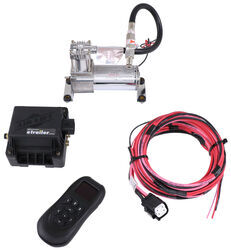

- Air Bag Compressor Kit
- Smartphone App
- Wireless Remote
- Dual Path
- Digital Display
- No Tank
- Standard Duty
- Air Lift
more information >
Featured Help Information
Instructions

Continue Researching
- Q&A: Firestone or Air Lift 7500 Air Spring Kit for 2019 Ford F-450
- Q&A: Recommended installer for the Firestone Ride-Rite Airbags on a 2019 Toyota Tundra
- Q&A: Should I Get Loadlifter 5000 Or 7500 For Towing A 15K Fifth Wheel
- Article: Best Air Bag Suspension 2025
- Q&A: Finding Air Bag Kit Installer for 2025 Chevy Silverado 3500
- Q&A: What Firestone Air Bag Kit and Spacer do I Need for My 2022 F-350 with the Tremor Package?
- Q&A: What is Minimum and Max of MORryde I-Beam Stabilizer Height
- Q&A: Difference Between The Less Expensive AND More Expensive Air Lift Compressor Kits
- Article: Choosing the Right Suspension Kit for Your Truck and Trailer
- Article: Should You Add an Air Compressor to Your Air Bags?
- Article: The Upgrades: Firestone Air Command Kits
- Article: 4 Steps to Choosing Your 5th Wheel Pin Box
- Article: The 5 Best Trailer Drop Hitches You Can Buy
- Article: Brake Controller 7- and 4-Way Installation Kit (ETBC7)