


Can TST TPMS Monitor Brightness Be Manually Adjusted
Updated 05/08/2026 | Published 10/05/2022
Question:
I recently bought the TST 507 Color. The unit will not stay bright enough nor predictably enough to read. Is there a setting I can change for the brightness or back light?
asked by: Russell B
Helpful Expert Reply:

The brightness on the TST color displays, like what comes with the TST TPMS for RVs # TST-507-FT-6-C, have an auto-adjust setting for the monitor so there isn't a way to manually adjust this.
Since you're having issues with it not being bright enough you may need to change the location of the monitor. There is an "eye" sensor on the back of the monitor that can sense how bright the surroundings are so if the back of the monitor is in a cubby or shadow then you need to move it so it sees the brightness on your dash and it will, in turn, get brighter.

Cliff
5/8/2026
I have mine in the windshield with nothing blocking the sensor. It is so dim it isn't readable. Even if i move it in bright sunlight. Could it be defective?

Product Page this Question was Asked From
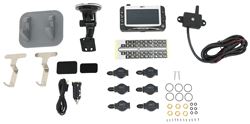
TST TPMS for RVs - Color Display - Signal Booster - 6 Flow Through Tire Sensors

- TPMS Sensor
- Camper
- 5th Wheel
- Motorhome
- Truck/SUV
- Flow Through Sensors
- 6 Sensors
- Extended Range
- Color Monitor
- TST
more information >
Featured Help Information
Instructions
Miscellaneous Media


Continue Researching
- Shop: Color Monitor for TST TPMS Systems
- Shop: Replacement Amber Lens for Furrion Vision S Side Marker Light RV Cameras - Qty 1
- Shop: Towing Mirrors
- Shop: CIPA Custom Towing Mirrors - Slip On - Driver Side and Passenger Side
- Shop: Sun Shade for TST 507 Series Widescreen Displays
- Shop: Vehicle Tow Bar Brake System
- Shop: Demco Autoslide Locking Plate for Lippert Rhino Pin Boxes
- Search Results: demco capture plate
- Video: Review of Demco 5th Wheel Hitch - Autoslide Locking Plate - DM76FR
- Q&A: Troubleshooting Blue Ox Patriot
- Q&A: Troubleshooting Blue Ox Patriot Braking System with Arm that Won't Retract
- Shop: Hughes Autoformers Ground Neutral Bonded Plug for Generators
- Video: What to Know About the Valterra Clog Killer Tank Wand System for RV Black Water Tank
- Shop: Valterra Clog Killer Tank Wand System for RV Black Water Tank - 60"
- Video: An In-Depth Look at the Roadmaster Spare Tire Mount
- Q&A: Torque Recommendation for Pin Box Bolts
- Article: Trailer Wiring Diagrams
- Q&A: What is the Difference Between a Class II and a Class III Hitch?
- Video: Firestone Ride-Rite Air Bags with Easy Mount Compressor Feature Breakdown
- Search Results: trailer hitch
- Shop: Trailer Hitch
- Search Results: trailer tires and wheels
- Article: Brake Controller 7- and 4-Way Installation Kit (ETBC7)
- Shop: Trailer Wiring
- Q&A: Lug Nut Torque Chart for Trailer Wheels
- Q&A: Installation Time for Blue Ox BX1128 Flat Tow Base Plate Kit for 2016 Jeep Grand Cherokee
- Search Results: trailer wiring
- Article: How to Measure for Trailer Hitch Drop
- Video: A Look at the Power Mountain Tallboy 6 Ton Off-Road Bottle Jack with a Military Cargo Trailer
- Shop: Suspension Enhancement

on Accessories and Parts

















Hank
5/2/2026
I came here looking for the same backlight answer. The tire/axle icons are easy enough to see however the red hi pressure and low pressure text is extremely difficult to see even out of the sunlight. TST should really change the color